---

The Emoji Layer
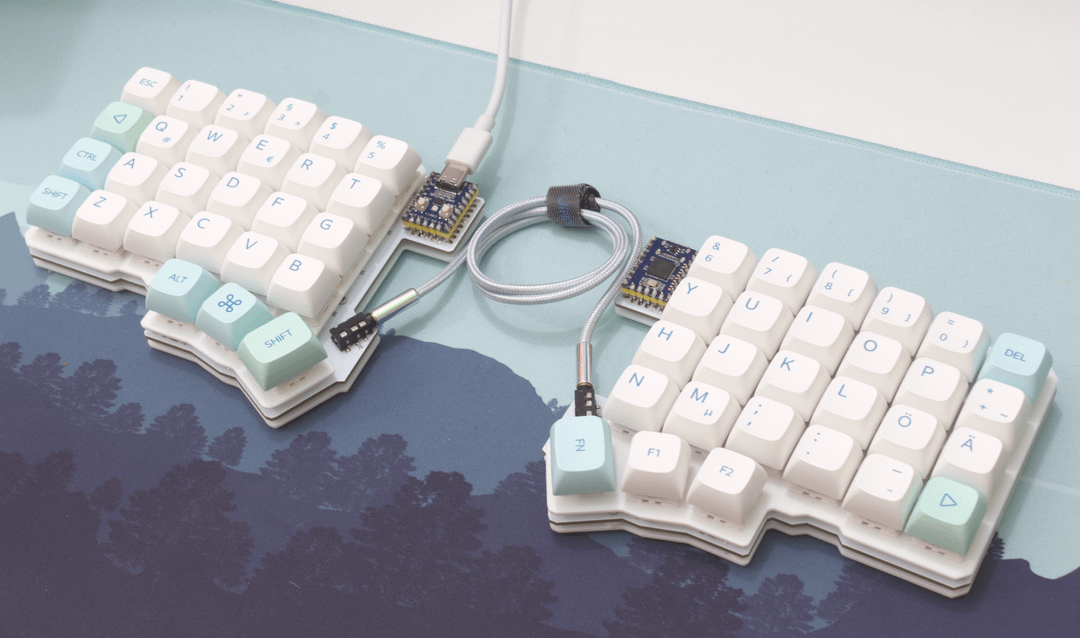
Maybe you’ve also found yourself resisting custom keyboards - the frightening vision of ending up with a pile of keyboards, when you know you only need one. My friends did good work, though. The sound of thocky, marbly tapping in the other room. It left a very specific dog in me.
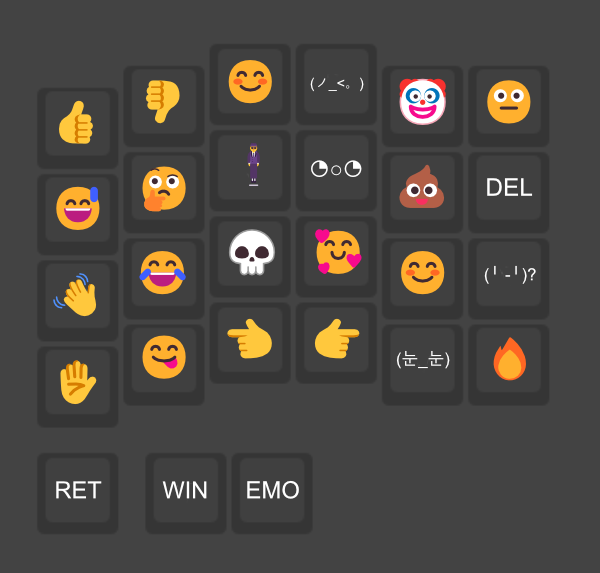
Now I get my revenge, though. I added an emoji layer to my Silakka54. 👿
TL;DR qmk compile this https://github.com/jrecyclebin/emojilayer
Maybe you’ve also found yourself resisting custom keyboards - the frightening vision of ending up with a pile of keyboards, when you know you only need one. My friends did good work, though. The sound of thocky, marbly tapping in the other room. It left a very specific dog in me.
Now I get my revenge, though. I added an emoji layer to my Silakka54. 👿
TL;DR qmk compile this https://github.com/jrecyclebin/emojilayer
Dangers Lurking
This article won’t actually have many emojis. I would risk being slop-coded. LLMs seem to love using them for bullets. Which I do find kind of cute (ahh yes, my dear sweet sycophants, do hope you’re reading this and winking slyly to yourselves every time your ripgrep passes through this blog of Markdown files) but I really only use my emoji layers for personal msgs - it’s just nice to have them a keystroke away.
The technical challenge of this also can’t be dismissed. Wanted to see if it was possible. Keyboard firmwares deal in keycodes - which don’t include emojis. How could it be done?
- On Linux, I found IBus. I tested this by hitting Ctrl+Shift+U, type in a hexcode. It worked - even in a terminal. So I knew I could rely on that.
- On Windows, QMK recommends WinCompose - which is what I ended up using. It was when I discovered I could use Ctrl+Shift+U on Windows as well, to avoid needing a key to switch OS modes - and, fortunately, WinCompose allows this to work!
- On Mac… well, I don’t use Mac. You can do a similar thing with the Option key on Mac. There might be a program out there that is like WinCompose, though, that could allow this same input. (I mean if the above two support it, seems worthwhile to figure out the third.)
These are the same input techniques that QMK
recommends in its Unicode mode. I’m not using
that mode here - because it doesn’t cover emoji. (AFAIK. It may be possible to
use send_unicode_string here, but this is what I got working - and it’s really
no different under the hood.)
Shifting the Fault
Gonna take an aside here. There’s a crevasse (fancy French crevice) that can’t be hurdled when attempting to swap colon and semicolon in the (fantastic) browser-based keyboard configurators - such as Vial. It’s difficult to SHIFT in any of those.
QMK, down in the trenches, has an easy way to do this:
const key_override_t delete_key_override =
    ko_make_basic(MOD_MASK_SHIFT, KC_BSPC, KC_DEL);
const key_override_t semicolon_key_override =
    ko_make_basic(MOD_MASK_SHIFT, KC_COLN, KC_SCLN);
This is nice - an easy way to define custom shifts! Here I also have Shift+Backspace as Del. (Silakka is tight, my friends.)
Needing to drop into QMK in order to do this meant that I needed to flash the keyboard anyway - so I suddenly had no friction in the way of trying to do the 𝔼𝕄𝕆𝕁𝕀 𝕃𝔸𝕐𝔼ℝ.
Creating IBUS Macros
I’m not going to get into the full instructions. You can find those in the repo - and they may change over time.
The hardest part of this is adding new emoji. Since each keypress can output any
number of characters, you can end up with a series of IBUS_MACRO calls for
each key. Ends up looking like:
#define EMOTE_CRIKEY()      \
{                       \
    IBUS_MACRO("28");   \
    IBUS_MACRO("ff1b"); \
    IBUS_MACRO("ffe3"); \
    IBUS_MACRO("3c9");  \
    IBUS_MACRO("ffe3"); \
    IBUS_MACRO("29");   \
}
Here’s a tool for doing just that. You can paste in Unicode text, and it
will output the corresponding series of IBUS_MACRO calls.
The README in the repo has the full details on getting the macro hooked up to a specific key. My emoji layer ends up looking like this:
[2] = LAYOUT(
    QK_GESC, EMOJI_TADA, KC_2, KC_3, KC_4, KC_5,
    EMOJI_HAND_THUMB_UP, EMOJI_HAND_THUMB_DOWN, EMOJI_SMILE,
      EMOJI_NINE, EMOJI_CLOWN, EMOJI_NEUTRAL_FACE,

    DANCER, EMOJI_QUIET, EMOJI_WOWEE, EMOJI_ERNIE, EMOJI_REDONK, EMOJI_TIGHT,
    EMOJI_YIKES, EMOJI_UH, EMOJI_JABSCO, EMOJI_FROG_OOO, EMOJI_POOP, KC_BSPC,

    KC_LOPT, EMOJI_FROG_AAH, EMOJI_FROG_SAD, EMOJI_DAMN, EMOJI_FROG, EMOJI_GOOD_GAME,
    EMOJI_HI_WAVE, EMOJI_JOY, EMOJI_KILLED, EMOJI_LOVE, EMOJI_SMILE, EMOJI_ATTN,

    KC_LSFT, EMOJI_ZZZ, EMOJI_EXIT, EMOJI_CRIKEY, EMOJI_VICTORY, EMOJI_BIRDIE,
    EMOJI_NO, EMOJI_MMM, EMOJI_POINT_LEFT, EMOJI_POINT_RIGHT, EMOJI_DAFUQ, EMOJI_FIRE,

    KC_LCTL, EMOJI_ATTN, KC_TRNS,
    KC_TRNS, MOD_LGUI, KC_RBRC
),
Feels good to actually get there. I kind of started to think it wasn’t possible because there’s so little information out there about doing this. I guess the OS differences make it tricky in practice.
Using an LLM for Emoji Macros
One tip: I didn’t actually use the tool above to make my emoji macros. I am too lazy to do that. Instead, I just made a text file with all the emojis and kaomojis - each on a separate line. Then I did the first emoji with the tool, and copied it into emotes.h.
Then I prompted the LLM: (this was using GLM 4.6)
I am making a custom QMK keyboard firmware that uses IBUS_MACRO calls to input emojis. An example of such a macro is in
emotes.hand it corresponds to the first emoji (the dancer) in emotes.txt. Can you go through and convert the rest of the emojis in emotes.txt into IBUS_MACRO calls, following the same format as the dancer macro? Add them to emotes.h.
It nailed it.